
How to Download DaVinci Resolve Studio (Quick Upgrade Guide for Windows and Mac)
Disclosure: this page contains Amazon affiliate links. As an Amazon Associate we earn from qualifying purchases, at no extra cost to you.
Hello, future Studio editor, here’s the quickest road from a search box to a freshly installed DaVinci Resolve Studio.
Picture DaVinci Resolve Studio installed and ready on your computer, just a few clicks after typing “Blackmagic support” into a search box.
Blackmagic Design keeps the free version and the paid Studio version side by side on one download list, and the whole trick is clicking the right one. If you’re upgrading, a DaVinci Resolve Studio activation card on Amazon carries the key you’ll paste in after installing.
Short answer: To download DaVinci Resolve Studio, open Blackmagic Design’s support page, find DaVinci Resolve Studio 21.2 (not the free DaVinci Resolve 21.2) under Latest Downloads, and click Mac OS X, Windows or Linux. Skip the form with Download Only in its lower left corner, unzip the file, run the installer and activate it with your key.
- Where
- Blackmagic Design’s DaVinci Resolve and Fusion support page, the only official download source
- Newest Studio download
- DaVinci Resolve Studio 21.2 Update, dated
- Platforms
- Mac OS X, Windows, Linux and Windows ARM
- The form
- Optional for Studio (Download Only link), required for the free version
- What you get
- A .zip file holding the DaVinci Resolve Studio installer
- What unlocks it
- An activation key, a USB license dongle or a Blackmagic Cloud license
Where do you download DaVinci Resolve Studio?
You download DaVinci Resolve Studio from Blackmagic Design’s own support website, and nowhere else. In our tutorial we simply searched Google for “Blackmagic customer support” and opened the first result.
The support page lists every software update Blackmagic makes, for cameras, capture cards and converters too. That’s why the DaVinci Resolve Studio download takes some scrolling to find in the Latest Downloads column.
The reseller COREMICRO gives the reason to stay on the official page: Third-party download sites often host old or modified builds.
A Mac also has a second official route, the Mac App Store, covered in the install section below.
How do you download DaVinci Resolve Studio, step by step?
To download DaVinci Resolve Studio, pick the Studio entry in Blackmagic’s download list, choose your system and skip the form. These steps follow our Resolve 18 tutorial, updated with today’s version names:
- Open blackmagicdesign.com/support, or search for “Blackmagic customer support” and open the first result.
- Scroll the Latest Downloads list past the camera and hardware updates.
- Skip DaVinci Resolve 21.2 Update. That’s the free version.
- Find the next entry, DaVinci Resolve Studio 21.2 Update, and look at the buttons at its bottom.
- Click Mac OS X, Windows, Linux or Windows ARM. Our tutorial picks Windows.
- When the registration form appears, you don’t have to fill it in. Click Download Only in the form’s lower left corner.
- Wait for the download to finish, then unzip it and run the installer (next sections).
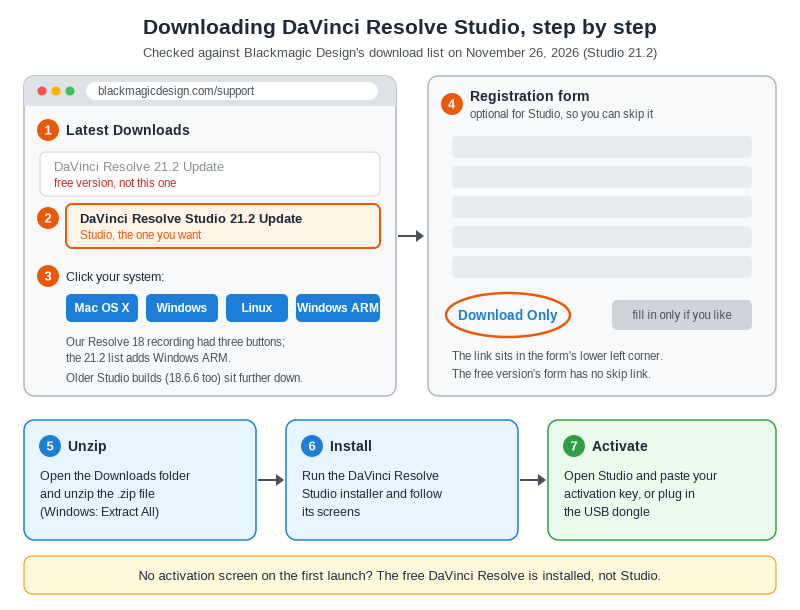
What the diagram shows, in text:
- 1, the support page: blackmagicdesign.com/support, Latest Downloads list.
- 2, the right entry: skip DaVinci Resolve 21.2 Update (free); pick DaVinci Resolve Studio 21.2 Update.
- 3, your system: Mac OS X, Windows, Linux or Windows ARM. Our Resolve 18 recording had three buttons; the 21.2 list adds Windows ARM.
- 4, the form: optional for Studio; Download Only sits in its lower left corner. The free version’s form has no skip link.
- 5, unzip: open the Downloads folder and unzip the .zip file (Windows: Extract All).
- 6, install: run the DaVinci Resolve Studio installer and follow its screens.
- 7, activate: open Studio and paste your activation key, or plug in the USB dongle.
- Footer: no activation screen on the first launch means the free DaVinci Resolve is installed, not Studio.
Can you still download DaVinci Resolve Studio 18?
Yes. On November 26, 2026, Blackmagic’s download list still offered DaVinci Resolve Studio 18.6.6 Update (March 20, 2024), further down the same list. Its description says it requires a DaVinci Resolve Studio license dongle or software activation code
, the same as the newest build.
Do you have to fill out the DaVinci Resolve download form?
No, not for DaVinci Resolve Studio. The registration form is optional, and the Download Only link in its lower left corner starts the download straight away, exactly as our tutorial shows.
The free DaVinci Resolve is different. Blackmagic’s download list marks the free DaVinci Resolve 21.2 as requiring registration and DaVinci Resolve Studio 21.2 as not requiring it. So a free download asks for the form every time.
How do you install DaVinci Resolve Studio after the download?
To install DaVinci Resolve Studio, unzip the downloaded package and run the installer inside it. Our tutorial’s last step is exactly that: go to the download folder, unzip, and execute the DaVinci Resolve Studio installation file.
How do you install DaVinci Resolve Studio on Windows 11?
- Open File Explorer and go to your Downloads folder.
- Right-click the DaVinci Resolve Studio .zip file and choose Extract All.
- Open the extracted folder and double-click the DaVinci Resolve Studio installer.
- Follow the installer’s screens. The Resolve 21 manual (page 4411) notes that the Studio installer has a Custom Install option, which you only need for extras such as the OFX Renderer plugin.
- Open DaVinci Resolve Studio. The manual (page 16) says the installer’s onboarding questions set the most important preferences on the first run.
How do you download DaVinci Resolve Studio on a Mac?
On a Mac, click Mac OS X on the DaVinci Resolve Studio 21.2 entry, open the downloaded file from your Downloads folder and run the installer inside. DaVinci Resolve 21 needs an Apple silicon Mac and macOS 15 or later.
The Mac App Store is the other official route. The free DaVinci Resolve is 2.5 GB there, and the paid DaVinci Resolve Studio app is 6.7 GB, both version 21.2 (November 6).
The App Store copy of Studio has limits, and Apple’s listing points to the website version for them: If you need these features, please download DaVinci Resolve Studio from the Blackmagic Design support website.
What about Linux and Windows on Arm?
The Linux and Windows ARM buttons sit on the same DaVinci Resolve Studio 21.2 entry. The Resolve 21 requirements list Rocky Linux 8.6 for Linux, and Windows 11 for ARM with a Qualcomm Snapdragon X Elite series processor for Windows on Arm.
Should you download DaVinci Resolve or DaVinci Resolve Studio?
Download the free DaVinci Resolve unless you need more than Ultra HD at 60 frames per second, several GPUs or the Neural Engine AI tools. Download DaVinci Resolve Studio if you already own a key, a dongle or a Blackmagic Cloud license. Studio won’t run without one.
Blackmagic’s DaVinci Resolve Studio page puts the headline difference in one line: Studio supports up to 120fps at a massive 32K resolution
.
| Question | DaVinci Resolve (free) | DaVinci Resolve Studio |
|---|---|---|
| Name in the download list | DaVinci Resolve 21.2 Update | DaVinci Resolve Studio 21.2 Update |
| Registration form | Required | Optional (Download Only) |
| Needs a license | No | Dongle, Blackmagic Cloud license or activation code |
| Highest resolution and frame rate | Ultra HD 3840 x 2160, up to 60 fps | 32K, up to 120 fps |
| GPUs | Multiple-GPU support isn’t included | Multiple GPUs for real-time 10-bit playback |
| Extras | The full editor, color, Fusion, Fairlight | Over 100 advanced features, 45 extra Resolve FX, DaVinci Neural Engine AI |
| Technical support | Blackmagic Design community forums only, says the download note | No forums-only note on the Studio download |
| Mac App Store size | 2.5 GB | 6.7 GB |
Want to see a Studio-only tool before deciding? Auto subtitles in DaVinci Resolve turn speech into a subtitle track, and that feature is Studio only.
How do you upgrade DaVinci Resolve free to Studio?
To upgrade DaVinci Resolve free to Studio, you install the Studio version and activate it. There is no in-app upgrade button that unlocks the free app with a key.
Honestly, that tiny Download Only link is the best-kept secret on the whole support page. It’s right there in the corner, quietly saving everyone a form.
- Back up your work: in the free version’s Project Manager, right-click each project and export it.
- Uninstall the free DaVinci Resolve. COREMICRO’s guide says to remove it first, because
The free and Studio versions share system files.
- Download DaVinci Resolve Studio 21.2 with the steps above and install it.
- Open DaVinci Resolve Studio and paste your activation key on the activation screen. Our guide to activating a DaVinci Resolve Studio license covers keys, dongles and Blackmagic ID.
- Import your exported projects if they don’t appear in the Project Manager.
Already own an older Studio key? COREMICRO says Blackmagic Design has not charged for a Studio version upgrade so far, so an older key activates DaVinci Resolve Studio 21.
Download the newest Studio build and enter the same key.
How do you download a DaVinci Resolve update?
To download a DaVinci Resolve update, choose DaVinci Resolve > Check For Updates inside the app, or download the newest Studio build from the support page and install it over your current one. The Resolve 21 manual describes the menu item:
To make it easier to ensure you’re using the latest version of DaVinci Resolve, you can now choose DaVinci Resolve > Check For Updates to notify you of new versions and download them when available.
Back up first when you jump a major version. Blackmagic’s 21.0.2 release notes, republished by SAMDB, say projects opened in 21.0.2 will no longer open in 20.3.2, and recommend a full project library backup.
| Studio version | First listed release | Newest listed update | Studio downloads listed |
|---|---|---|---|
| 16 | August 9, 2019 | 16.2.8, November 25, 2020 | 13 |
| 17 | February 25, 2021 | 17.4.6, March 29, 2022 | 16 |
| 18 | July 20, 2022 | 18.6.6, March 20, 2024 | 19 |
| 19 | August 22, 2024 | 19.1.4, March 21, 2025 | 9 |
| 20 | May 28, 2025 | 20.3.3, May 13, 2026 | 12 |
| 21 | June 3, 2026 | 21.2, November 4, 2026 | 9 so far |
In plain words: Resolve Studio 18, the version in our tutorial, got 19 downloadable builds, more than any other version in the list. Resolve Studio 21 reached 9 builds in its first five months.
Where is the DaVinci Resolve Studio beta?
A DaVinci Resolve Studio beta, when Blackmagic runs one, appears in the same support download list with “Beta” in its name. On November 26, 2026, the list held no Resolve beta, so DaVinci Resolve Studio 21.2 is the newest build.
Will DaVinci Resolve Studio 21 run on your computer?
DaVinci Resolve Studio 21 runs on an Apple silicon Mac with macOS 15, on Windows 10 Creators Update or Windows 11, on Windows 11 for ARM, and on Rocky Linux 8.6. Memory needs differ a lot by system. These are Blackmagic’s minimums as republished by SAMDB:
- Mac
- macOS 15 Sequoia or later, Apple silicon; 8 GB of memory, 16 GB with Fusion
- Windows
- Windows 10 Creators Update or later; 16 GB of memory, 32 GB with Fusion; a GPU with at least 4 GB of VRAM (OpenCL 1.2 or CUDA 12.8; NVIDIA Studio driver 581.57 or newer)
- Windows on Arm
- Windows 11 for ARM, Qualcomm Snapdragon X Elite series; 16 GB, 32 GB for 4K or Fusion
- Linux
- Rocky Linux 8.6; 32 GB of memory; a discrete GPU with at least 4 GB of VRAM
- Studio AI tools
- At least 16 GB of memory on a Mac, at least 16 GB of VRAM on Windows and Linux
Why is the DaVinci Resolve download not working?
Most DaVinci Resolve download and install problems come from picking the free entry, a form that won’t submit, or an installer run straight from the zip. Here are six common ones:
| What you see | Why it happens | The fix |
|---|---|---|
| No Download Only link | You opened the free DaVinci Resolve entry | Go back and pick the entry that starts with “DaVinci Resolve Studio” |
| The form won’t submit | A browser setting or blocker stops a required field | Try another browser, or use Download Only on the Studio entry |
| The installer won’t start | It’s still inside the .zip file | Unzip first (Windows: right-click, Extract All), then run it |
| No activation screen | The free version got installed | Uninstall it, install DaVinci Resolve Studio, then activate |
| Studio 21 won’t install on an older Mac | Resolve 21 needs Apple silicon and macOS 15 | Check the Mac’s chip and macOS version first |
| A Studio AI tool is missing | Some AI models are optional downloads | DaVinci Resolve > Extras Download Manager (manual page 131) |
What should you do right after installing DaVinci Resolve Studio?
Right after installing DaVinci Resolve Studio, activate it, confirm the version and grab any AI packages you need. A quick checklist from the Resolve 21 manual:
- Activate: paste your key on the activation screen, or plug in the dongle before opening the app.
- Confirm Studio: DaVinci Resolve > About DaVinci Resolve shows the installed version (page 4430).
- Stay current: DaVinci Resolve > Check For Updates (page 10).
- AI models: DaVinci Resolve > Extras Download Manager adds AI Voice Training and extra transcription languages (page 131).
- Replay the setup: Help > Welcome to DaVinci Resolve opens the initial installer screen again (page 4443).
Keep the activation email or card somewhere safe. The same key installs Studio again on your next computer, and on newer versions too, so far.
New to the app itself? Our DaVinci Resolve beginner tutorial walks through the Edit page and timeline you’ll see the moment Studio opens.
Two entries with nearly the same name, one link in a corner, one zip to open. You’ve got this, and Studio is worth the scroll.
Sources and further reading
- DaVinci Resolve and Fusion support (downloads) — Blackmagic Design support page and its download list; DaVinci Resolve Studio 21.2 Update of November 4, 2026 for Mac OS X, Windows, Linux and Windows ARM, registration required only for the free version, Studio 18.6.6 still listed, release dates of every Studio version, read November 26, 2026
- DaVinci Resolve 21 Reference Manual (PDF) — Blackmagic Design, July 2026, 4,444 pages; Check For Updates (page 10), installer onboarding questions (16), Extras Download Manager (131), Custom Install in the Studio installer (4411), About DaVinci Resolve (4430), Help > Welcome to DaVinci Resolve (4443), read November 26, 2026
- DaVinci Resolve Studio — Blackmagic Design product page; free version up to Ultra HD 60 fps, Studio up to 32K at 120 fps, multiple GPUs, over 100 advanced features, 45 extra Resolve FX, read November 26, 2026
- DaVinci Resolve on the Mac App Store — Apple App Store listing by Blackmagic Design; free, version 21.2 (November 6), 2.5 GB, macOS 15.0 or later, Apple silicon, 8GB of memory or 16GB with Fusion, read November 26, 2026
- DaVinci Resolve Studio on the Mac App Store — Apple App Store listing by Blackmagic Design; paid, version 21.2, 6.7 GB, macOS 15.0 or later, some features only in the support-website version, read November 26, 2026
- DaVinci Resolve 21.0.2 Released by Blackmagic Design — SAMDB, a Blackmagic Design reseller, July 3, 2026; Blackmagic’s minimum system requirements for macOS, Windows, Windows on ARM and Linux, and the project backup advice, read November 26, 2026
- How to activate Blackmagic Design DaVinci Resolve Studio license — COREMICRO, an authorized Blackmagic Design reseller, February 15, 2024; optional form with Download Only, remove the free version first, older keys activate Studio 21, read November 26, 2026
Questions and answers
How do I download DaVinci Resolve Studio?
Open Blackmagic Design’s support page, scroll the Latest Downloads list to DaVinci Resolve Studio 21.2 Update (not the free DaVinci Resolve 21.2 Update) and click Mac OS X, Windows, Linux or Windows ARM. Click Download Only on the form, unzip the file and run the installer.
Is DaVinci Resolve still free?
Yes. The free DaVinci Resolve 21.2 is on Blackmagic Design’s support page and free on the Mac App Store. It edits up to Ultra HD 3840 x 2160 at 60 fps. DaVinci Resolve Studio is the paid version, and only its license costs money.
How do I upgrade DaVinci Resolve free to Studio?
Export your projects, uninstall the free version, then download and install DaVinci Resolve Studio from Blackmagic’s support page. Open Studio and paste your activation key. The free app has no button that unlocks it with a key.
Should I download DaVinci Resolve or DaVinci Resolve Studio?
Download the free DaVinci Resolve unless you own a Studio license or need 32K, 120 fps, several GPUs or the Neural Engine AI tools. The Studio download won’t run without an activation code, a USB dongle or a Blackmagic Cloud license.
How do I download a DaVinci Resolve update?
Choose DaVinci Resolve > Check For Updates inside the app, or download the newest build from Blackmagic’s support page and install it. Back up your project library before a major update, because projects opened in a newer version may not open in the older one.