
How to Activate Blackmagic Design DaVinci Resolve Studio License (Key or Dongle)
Disclosure: this page contains Amazon affiliate links. As an Amazon Associate we earn from qualifying purchases, at no extra cost to you.
Hello there, Studio keyholder, ready to turn that little code into a fully unlocked editor?
Picture the moment your DaVinci Resolve Studio activation key arrives, in your email inbox or on the back of a small card.
Activating it is quick, as long as you open the right version of the app.
If you still need a key, DaVinci Resolve Studio activation cards on Amazon have the code printed on the back, the same kind of card our tutorial uses.
Short answer: To activate DaVinci Resolve Studio, install the Studio version (not the free one), open it, and paste the activation key from your card or email on the activation screen that appears after the welcome screen. A USB dongle needs no key: keep it plugged in. Monthly licenses use the Use Blackmagic ID button.
- Activation key
- Printed on the back of an activation card, or emailed to you when you buy from Blackmagic Design’s website
- Where you enter it
- The activation screen of DaVinci Resolve Studio, on the first launch after the welcome screen
- USB dongle
- No key to type: Studio runs on the computer the dongle is plugged into
- Monthly license
- Use Blackmagic ID, sign in, select the Organization, Continue (Resolve 21 manual, page 4295)
- Computers per key
- Two at the same time, says Blackmagic reseller COREMICRO
- Free up a computer
- Help > Deactivate License (Resolve 21 manual, page 4443)
What do you need to activate DaVinci Resolve Studio?
To activate DaVinci Resolve Studio you need two things: the Studio version installed, and one license. The license is an activation key, a USB dongle, a monthly license through Blackmagic Cloud, or a Mac App Store purchase.
Our tutorial covers the first two, the card with a code on the back and the dongle. The other three work differently, so here they are side by side.
| License type | How you get it | How it activates | Moving it |
|---|---|---|---|
| Activation key (card) | An activation card from a store such as Amazon or Walmart | Type or paste the code on the activation screen | Help > Deactivate License, then the same key on the new computer |
| Activation key (email) | Bought on Blackmagic Design’s website or from a reseller | Paste the emailed code on the activation screen | Same as the card: two computers at once |
| USB dongle | A Studio dongle | Plug it in and keep it there while you use DaVinci Resolve | Plug the dongle into the other computer |
| Monthly license | An Organization on Blackmagic Cloud assigns it to a member | Use Blackmagic ID, sign in, select the Organization, Continue | Sign in on the workstation you need |
| Mac App Store | The DaVinci Resolve Studio app from the Mac App Store | Your Apple account, no key | Apple’s Family Sharing covers up to six family members |
Where do you find your DaVinci Resolve Studio activation key?
Your DaVinci Resolve Studio activation key is on the back of the activation card, or in your email inbox if you bought DaVinci Resolve Studio from Blackmagic Design’s website. Our tutorial shows both: the card’s code is hidden on its back, and a web purchase sends the code by email.
- Activation card: the code is printed on the back of the card. Type it exactly, character by character.
- Email from Blackmagic Design or a reseller: search your inbox for “DaVinci Resolve Studio” and “license”. COREMICRO’s guide says its keys arrive in an email titled with the order.
- Blackmagic camera: Blackmagic’s Pocket Cinema Camera page says every model includes a full version of DaVinci Resolve Studio, so check the paperwork that came with the camera.
How do you enter a DaVinci Resolve key on the activation screen?
You enter a DaVinci Resolve key on the activation screen that DaVinci Resolve Studio shows on its first launch, right after installation and the welcome screen. These steps follow our Resolve 18 tutorial and COREMICRO’s activation guide:
- Download the DaVinci Resolve Studio installer from Blackmagic Design’s support page. Pick the Studio version for your system, not the free DaVinci Resolve.
- Run the installer and choose DaVinci Resolve Studio. COREMICRO’s guide says to uninstall any free DaVinci Resolve first.
- Open DaVinci Resolve Studio and go through the welcome screen.
- On the activation screen, paste or type the key from your card or email.
- Confirm the activation. COREMICRO’s guide says the key is checked online once, so stay connected to the internet for this step.
- DaVinci Resolve Studio opens with every paid feature unlocked.
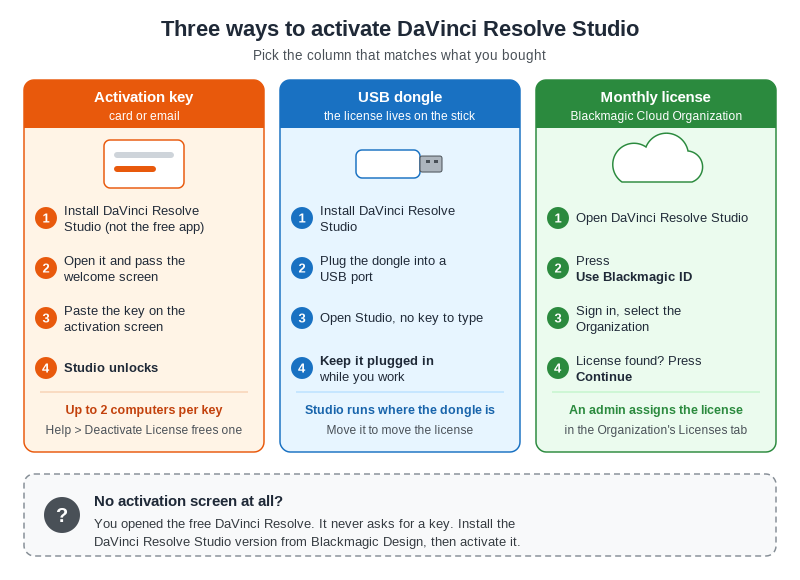
What the diagram shows, in text:
- Activation key, card or email: 1, install DaVinci Resolve Studio, not the free app. 2, open it and pass the welcome screen. 3, paste the key on the activation screen. 4, Studio unlocks. Up to 2 computers per key; Help > Deactivate License frees one.
- USB dongle: 1, install Studio. 2, plug the dongle into a USB port. 3, open Studio, with no key to type. 4, keep the dongle plugged in while you work. Studio runs where the dongle is.
- Monthly license: 1, open DaVinci Resolve Studio. 2, press Use Blackmagic ID. 3, sign in and select the Organization. 4, when the license is found, press Continue. An admin assigns the license in the Organization’s Licenses tab.
- No activation screen at all: the free DaVinci Resolve is open. It never asks for a key, so install the Studio version, then activate.
How do you activate a monthly license with a Blackmagic ID?
A monthly DaVinci Resolve Studio license activates with your Blackmagic ID instead of a key. The DaVinci Resolve 21 manual (page 4295) gives these steps:
- Open DaVinci Resolve Studio and press Use Blackmagic ID.
- Sign in to Blackmagic Cloud with the member account that has a license assigned to it.
- Select the Organization that holds your license.
- DaVinci Resolve tells you whether it found an active license. Press Continue.
How does the DaVinci Resolve Studio dongle work?
The DaVinci Resolve Studio dongle is a USB stick that holds the license, so there’s no activation key to enter. Our tutorial puts it simply: insert it into one of your computer’s USB ports and keep it there while you use DaVinci Resolve Studio.
Because the license travels with the stick, the Blackmagic Design dongle suits people who switch between an office computer and a home computer. Install DaVinci Resolve Studio on both, and move the dongle to whichever one you’re using.
The Resolve 21 manual names the license dongle in one more place: Fusion network rendering, where the dongle, the Render Master and the render nodes must share one local network.
Why is there no activation screen in DaVinci Resolve?
If DaVinci Resolve opens without an activation screen, you installed the free DaVinci Resolve. The free version never asks for a key, and our tutorial says you must get the Studio version to enter an activation code.
To check which one you have, choose DaVinci Resolve > About DaVinci Resolve. The manual (page 4430) says it opens the splash screen with the installed version, and Studio’s name includes the word “Studio”.
To switch, first back up your work: in the Project Manager, right-click each project and export it. Then uninstall the free version, install DaVinci Resolve Studio and enter your key. Our guide to downloading DaVinci Resolve Studio walks through the download page.
How many computers can one DaVinci Resolve Studio key activate?
One DaVinci Resolve Studio activation key works on two computers at the same time, for one user, says the authorized Blackmagic reseller COREMICRO. Windows, macOS and Linux can be mixed under the same key.
Honestly, the first time Studio opens with no lock icons feels a bit like getting the keys to the whole building instead of just the lobby.
To move the license to a new computer, free one of the two activations from the computer you’re leaving. The DaVinci Resolve 21 manual lists the menu item in the Help menu:
Deactivates the DaVinci Resolve Studio license on this computer.
- On the old computer, open DaVinci Resolve Studio.
- Choose Help > Deactivate License.
- On the new computer, install DaVinci Resolve Studio and enter the same activation key.
Do this before you sell, wipe or give away a computer. Once the computer is gone, you can’t open its Help menu any more.
What paid features do you get in DaVinci Resolve Studio?
DaVinci Resolve Studio adds the AI tools of the DaVinci Neural Engine, extra Resolve FX, higher resolutions and immersive audio to the free DaVinci Resolve. Blackmagic’s DaVinci Resolve Studio page sums it up as With over 100 advanced features, Studio includes DaVinci AI Neural Engine, additional Resolve FX, stereoscopic 3D and more!
Our tutorial’s favorite is turning speech into subtitles that appear in real time as the audio plays. That’s the manual’s Create Subtitles from Audio, and it’s Studio only. The steps are in adding auto subtitles in DaVinci Resolve.
| Studio feature | What it does | Manual page |
|---|---|---|
| Create Subtitles from Audio | Turns the dialog on a timeline into a subtitle track | 1274 |
| Audio Transcription | Full transcripts of clips, for text-based editing | 1018 |
| IntelliTrack AI Point Tracker | Neural Engine tracking in the Color, Fusion and FX trackers | 3375 |
| Magic Mask v2 | AI masks that follow people and objects | 3339 |
| Voice Isolation | Separates a voice from loud background noise | 1146 |
| Music Remixer | Splits music into vocals, drums, bass, guitar and other stems | 1148 |
| Smart Reframe | Makes a vertical 9:16 version of a horizontal shot | 756 |
| Super Scale | High-quality upscaling | 293 |
| Multicam SmartSwitch | Switches multicam angles automatically | 1070 |
| AI Audio Assistant | Creates a final audio mix automatically | 4000 |
Is tracking a Studio-only feature in DaVinci Resolve?
No, the normal point tracker works in the free DaVinci Resolve. What DaVinci Resolve Studio adds is the IntelliTrack AI Point Tracker, which the manual says is less likely to fail in scenarios like tracking a subject behind brief occlusions
. To try regular tracking first, see object tracking in DaVinci Resolve.
Is there a free DaVinci Resolve license key?
No real DaVinci Resolve Studio license key is free, but the free DaVinci Resolve needs no key at all. Our tutorial reminds you that the free version can still record, edit and publish videos without any activation code.
There’s one honest way to get Studio without buying a card. Blackmagic’s Pocket Cinema Camera page says All Pocket Cinema Camera models include a full version of DaVinci Resolve Studio.
Why is my DaVinci Resolve Studio activation not working?
Most DaVinci Resolve Studio activation problems come from the wrong app, a mistyped key or a full set of two activations. Here are seven common ones and their fixes:
| What you see | Why it happens | The fix |
|---|---|---|
| No activation screen | The free DaVinci Resolve is installed | Install DaVinci Resolve Studio from Blackmagic’s support page |
| The key isn’t accepted | A wrong character, or an extra space | Paste the key from the email, or retype the card slowly |
| Activation can’t finish | The key is checked online once | Connect to the internet for the activation step |
| The key is already in use | Both activations are taken | Help > Deactivate License on a computer you no longer use |
| Studio features still locked | The free app icon was opened, or both apps are installed | Check About DaVinci Resolve, uninstall the free version |
| Monthly license not found | No license is assigned to that Blackmagic ID | Ask the Organization’s admin to assign one in the Licenses tab |
| An AI tool is missing in Resolve 21 | Its AI model is an optional download | DaVinci Resolve > Extras Download Manager |
With a dongle, plug it in before you open DaVinci Resolve Studio and leave it in. Our tutorial says to keep it inserted the whole time you use the app.
What should you do right after activating DaVinci Resolve Studio?
Right after activating DaVinci Resolve Studio, update it and save your key somewhere safe. A short checklist from the DaVinci Resolve 21 manual:
- Update: DaVinci Resolve > Check For Updates (manual pages 10 and 4430).
- Stay updated: turn on Automatically Check for Updates in Preferences (page 110).
- AI models: DaVinci Resolve > Extras Download Manager adds optional AI model packages (page 131).
- Your key: keep the email or the card. You need the same key on your next computer.
- Before replacing a computer: Help > Deactivate License (page 4443).
Now that Studio is unlocked, try the feature our tutorial loves most: Create Subtitles from Audio, under Timeline > AI Tools on the Edit page.
New to the app? Our DaVinci Resolve beginner tutorial shows the Edit page and timeline you’ll use with every Studio tool.
Keep that key email somewhere you’ll find it again. Future you, on a shiny new computer, will be very grateful.
Sources and further reading
- DaVinci Resolve 21 Reference Manual (PDF) — Blackmagic Design, July 2026, 4,444 pages; Help > Deactivate License (page 4443), monthly license with Use Blackmagic ID (4295), About DaVinci Resolve and Check for Updates (10, 110, 4430), Extras Download Manager (131), Studio Version Only features (293 to 4000, IntelliTrack 3375), license dongle for Fusion network rendering, read November 26, 2026
- DaVinci Resolve Studio — Blackmagic Design product page; ‘over 100 advanced features’, DaVinci AI Neural Engine, version 21, read November 26, 2026
- DaVinci Resolve and Fusion support — Blackmagic Design support page, where the DaVinci Resolve Studio installers and updates download, opened November 26, 2026
- Blackmagic Pocket Cinema Camera — Blackmagic Design product page; every Pocket Cinema Camera model includes a full version of DaVinci Resolve Studio, read November 26, 2026
- DaVinci Resolve Studio on the Mac App Store — Apple App Store listing by Blackmagic Design; version 21.2 (November 6), Family Sharing for up to six family members, AI Audio Assistant, read November 26, 2026
- How to activate Blackmagic Design DaVinci Resolve Studio license — COREMICRO, an authorized Blackmagic Design reseller, February 15, 2024; installing Studio, pasting the key, online check, two computers per key, Help > Deactivate License, read November 26, 2026
Questions and answers
How do I activate DaVinci Resolve Studio with a key?
Install DaVinci Resolve Studio, not the free version, and open it. After the welcome screen, the activation screen appears: paste the key from your activation card or email and confirm it while you’re online. Studio then opens with its paid features unlocked.
Where is my DaVinci Resolve Studio activation key?
It’s on the back of the activation card, or in your email inbox if you bought DaVinci Resolve Studio on Blackmagic Design’s website or from a reseller. If the license came with a Blackmagic Pocket Cinema Camera, check the paperwork in the camera’s box.
Can I use my DaVinci Resolve Studio license on two computers?
Yes. One activation key works on two computers at the same time for one user, says Blackmagic reseller COREMICRO, and Windows, macOS and Linux can be mixed. To use a third computer, choose Help > Deactivate License on one of the first two.
Why doesn’t DaVinci Resolve ask for an activation key?
You installed the free DaVinci Resolve, which never asks for a key. Back up your projects, uninstall the free version, then install DaVinci Resolve Studio from Blackmagic Design’s support page. The activation screen appears on Studio’s first launch.
Is there a free DaVinci Resolve Studio license key?
No legitimate key is free, and keys shared online are someone else’s license or a crack. The free DaVinci Resolve needs no key and still edits, records and exports. Every Blackmagic Pocket Cinema Camera model includes a full version of DaVinci Resolve Studio.